> ## Documentation Index
> Fetch the complete documentation index at: https://mayan-mayanintern-image-upload.mintlify.site/llms.txt
> Use this file to discover all available pages before exploring further.
# Swap Widget
You can add the Mayan cross-chain swap widget to your website by including a few lines of code:
(example: [buybonk.com](https://buybonk.com))
```php theme={null}
```
That's it! You now have a fully-functional native to native bridge on your website.
### Customizing Your Widget
You can customize the widget to suit your needs, such as limiting tokens or networks. Here’s a complete example showing different parameters you can set:
```html theme={null}
...
...
...
```
### Customizable Properties
* `appIdentity`: This object contains information about your project, such as the name, icon, and website URL.
* `rpcs`: This object contains the RPC URLs for the blockchain networks you want to support. Make sure to update these URLs with your own URLs.
* `sourceChains`: List of supported source chains by the widget. To fetch list of supported tokens you can use the [Token List API](/integration/quote-api#token-list).
* `destinationChains`: List of supported destination chains by the widget. To fetch list of supported tokens you can use the [Token List API](/integration/quote-api#token-list).
* `tokens`: This object contains the list of token mint/contract addresses for each network you want to support. You can add or remove tokens as needed. You can check the list of supported chains by Mayan using [Chain List API](/integration/quote-api#chain-list).
* `defaultGasDrop`: You can change the default gas of ["Gas on destination"](/dapp/gas-on-destination) for each chain. if you don't set this parameter, widget will use values from the this [table](/dapp/gas-on-destination#gas-on-destination-default-and-max-values%3A).
* `solanaReferrerAddress, evmReferrerAddress`: if you wish to receive referrer fee you can assign your wallet address to these parameters.
* `referrerBps`: You can set the referrerBps you are willing to receive from user (Max: 50 bps)
If you don't specify list of tokens/chains, all the the supported tokens/chains will appear.
* `solanaExtraRpcs`: Optional field to improve transaction speed and success rate by sending transactions to multiple RPCs. Use this if user experience is a priority.
* `isNarrow`: A flag to render the widget in containers less than 300px wide. Not recommended as it can damage the widget interface.
* `colors`: This object allows you to customize the colors of the widget by setting the following properties:
```go theme={null}
type Colors = {
N000?: string;
N100?: string;
N300?: string;
N500?: string;
N600?: string;
N700?: string;
N900?: string;
tLightBlue?: string;
green?: string;
lightGreen?: string;
red?: string;
lightRed?: string;
lightYellow?: string;
primary?: string;
primaryGradient?: string;
tWhiteLight?: string;
tWhiteBold?: string;
tBlack?: string;
mainBox?: string;
background?: string;
darkPrimary?: string;
alwaysWhite?: string;
tableBg?: string;
transparentBg?: string;
transparentBgDark?: string;
buttonBackground?: string;
toastBgRed?: string;
toastBgNatural?: string;
toastBgGreen?: string;
}
```
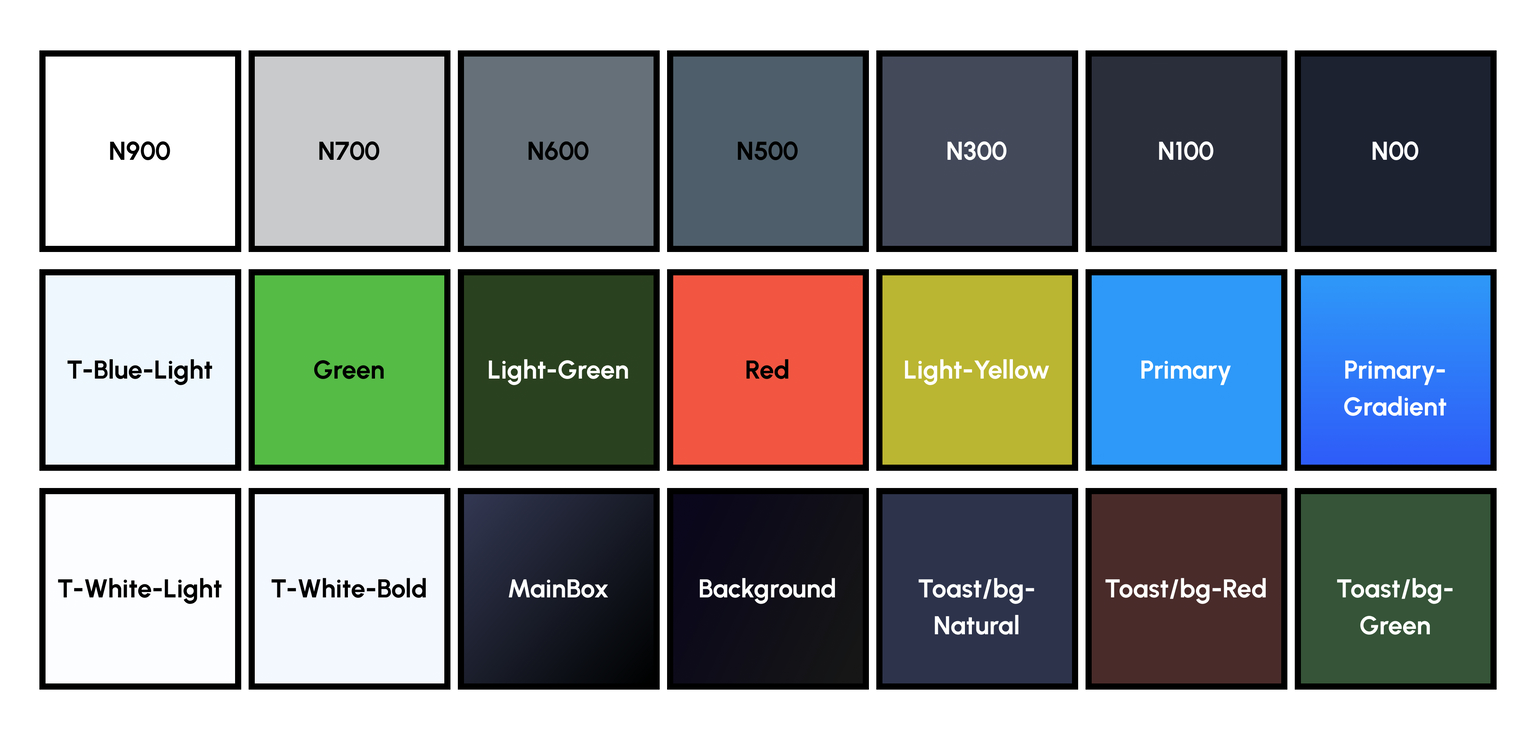 You can try Mayan widget with your website's design in Figma:
Figma
### Listeners:
You can set listeners if you need to trigger custom actions (e.g., show notification when the swap finishes)
Mayan Swap fires events upon swap initiation, completion, or refund.
```javascript theme={null}
MayanSwap.setSwapInitiateListener(callback: (swap: SwapInfo) => void)
MayanSwap.setSwapCompleteListener(callback: (swap: SwapInfo) => void)
MayanSwap.setSwapRefundListener(callback: (swap: SwapInfo) => void)
```
```typescript theme={null}
type SwapInfo = {
hash: string,
fromChain: string,
toChain: string,
fromToken: string,
toToken: string,
fromAmount: number
}
```
Note: even when the widget isn't on the DOM, the callbacks will still be invoked if you set them.
To avoid unexpected errors, you can remove the listeners:
`MayanSwap.removeSwapInitiateListener()`
You can try Mayan widget with your website's design in Figma:
Figma
### Listeners:
You can set listeners if you need to trigger custom actions (e.g., show notification when the swap finishes)
Mayan Swap fires events upon swap initiation, completion, or refund.
```javascript theme={null}
MayanSwap.setSwapInitiateListener(callback: (swap: SwapInfo) => void)
MayanSwap.setSwapCompleteListener(callback: (swap: SwapInfo) => void)
MayanSwap.setSwapRefundListener(callback: (swap: SwapInfo) => void)
```
```typescript theme={null}
type SwapInfo = {
hash: string,
fromChain: string,
toChain: string,
fromToken: string,
toToken: string,
fromAmount: number
}
```
Note: even when the widget isn't on the DOM, the callbacks will still be invoked if you set them.
To avoid unexpected errors, you can remove the listeners:
`MayanSwap.removeSwapInitiateListener()`
`MayanSwap.removeSwapCompleteListener()`
`MayanSwap.removeSwapRefundListener()`
### Default destination wallet
You can set default destination wallets so users don't need to connect their destination wallet:
```javascript theme={null}
destinationWallets: {
solana: 'solanaWalletAddress',
ethereum: 'ethereumWalletAddress'
},
```
### Alternative Widget Version Without WalletConnect
To avoid redeclaring web components if you've already added WalletConnect dependencies to your project or use a third party that includes it, use the version of the widget without WalletConnect:
```js theme={null}
```
### TypeScript Types
To use the Mayan Widget in a TypeScript project, you can define the configuration object types as follows:
```python theme={null}
type MayanWidgetChainName =
| "solana"
| "ethereum"
| "bsc"
| "polygon"
| "avalanche"
| "arbitrum"
| "optimism"
| "base";
```
```typescript theme={null}
type MayanWidgetConfigType = {
appIdentity: {
uri: string;
icon: string; // should be relative
name: string;
}; // use for Wallet Adapter
setDefaultToken?: boolean;
rpcs?: { [index in MayanWidgetChainName]?: string };
solanaExtraRpcs?: string[];
defaultGasDrop?: { [index in MayanWidgetChainName]?: number };
sourceChains?: MayanWidgetChainName[];
destinationChains?: MayanWidgetChainName[];
tokens?: {
from?: { [index in MayanWidgetChainName]?: string[] };
to?: { [index in MayanWidgetChainName]?: string[] };
featured?: { [index in MayanWidgetChainName]?: string[] };
};
solanaReferrerAddress?: string;
evmReferrerAddress?: string;
referrerBps?: number;
// Theme
isNarrow?: boolean;
colors?: Colors;
}
```
### Full Example
For a full example of the integration, you can check the source code of [buybonk.com](https://buybonk.com) on [GitHub](https://github.com/mayan-finance/buybonk). This repository provides a comprehensive example of how to integrate the Mayan Swap Widget into a project.